
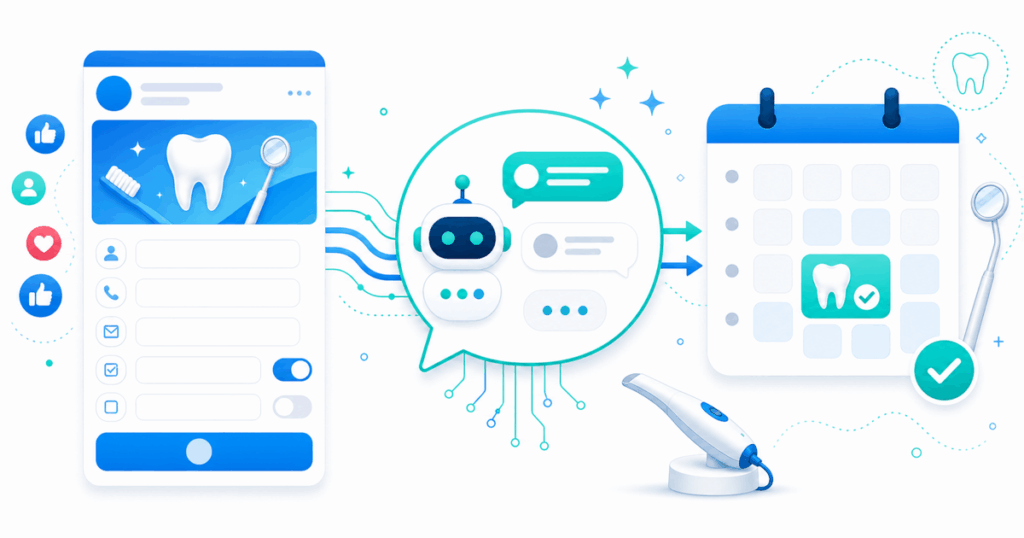
Facebook Lead Ads (formally Meta Lead Ads, sometimes Instant Forms) are still the cheapest way to capture a dental new-patient inquiry on social. Cost-per-lead in dental categories often sits between $8 and $15, well below most paid search alternatives. The problem isn’t getting the leads — it’s following up fast enough that they actually become patients.
This guide walks through the complete 2026 playbook for automating Facebook lead ad follow-up at a dental practice. It assumes you’ve already got campaigns running and are wondering why the booked-appointment numbers don’t match the lead count.
Why manual Facebook lead follow-up fails
The user journey on Facebook Lead Ads looks like this: the lead sees your ad in the feed, taps the form, the form auto-populates from their Facebook profile, they tap Submit, and they’re back in the feed within eight seconds. Their intent at this moment is curiosity, not commitment.
If you call them ninety minutes later, they don’t remember filling out the form. If you call the next day, they’ve already booked with a competitor. If you don’t call at all, you’ve paid Meta for a lead that produced nothing.
The fix is not better creative or different targeting. It’s reaching out before the user has put their phone down.
The 4 components of automated FB lead follow-up
1. Real-time lead ingestion
The most common mistake: using a CSV export or a manual download to move leads from Facebook into your follow-up system. This adds hours or days of delay and is a non-starter.
What you need: a native subscription to Meta’s leadgen webhook on your Facebook Business page. Meta delivers each form submission via webhook within seconds. Most modern dental marketing platforms support this — including Viva AI, GoHighLevel, HubSpot, and most agency CRMs. Configure it once per page and forget about it.
2. First contact within 5 minutes
Once a lead is in your system, the first outbound contact has to happen within five minutes. Ideally two to three. The first attempt should be a phone call, not an SMS — calls have dramatically higher pickup rates when timed right.
For practices without AI tools: this requires a dedicated person actively monitoring the lead queue during all hours your ads run, including evenings and weekends. Realistic only for very large practices and DSOs with a true call center.
For practices using an AI agent: the AI places the call automatically. The agent already knows the campaign, the offer, and the lead’s first name. The opening line is personalized.
3. Multi-channel drip if first contact fails
If the first call doesn’t connect (about 65 percent of the time, regardless of how fast you call), the next attempt should be a personalized SMS within 30 minutes. Not a voicemail — those convert poorly. The SMS should reference the practice name and the specific service the lead asked about (implants, ortho, cleanings, emergency, cosmetic).
If the SMS doesn’t get a reply, the next call attempt comes 24 hours later, during business hours, ideally at a different time of day than the first attempt. The pattern continues for five total attempts spread over 72 hours, then stops. Beyond five attempts, you’re spamming. Below five, you’re leaving conversions on the table.
4. Feedback loop to Meta’s algorithm
The single most underused trick in dental Facebook marketing is the Conversions API (CAPI) feedback loop. By default, Facebook optimizes your campaigns on lead form fills — the cheapest version of “conversion.” The algorithm then learns to find people who fill out forms cheaply, regardless of whether they ever become patients.
If you push booked-appointment events back to Meta via CAPI, Facebook learns who actually books and starts to optimize for that pattern. Over four to eight weeks, your CPL on booked appointments — the only number that matters — drops by 30 to 50 percent.
Most agencies and most dental practices don’t run this loop because it’s technically annoying to set up. AI agents like Viva fire CAPI events automatically when the AI completes a booking, so this complexity disappears.
What to measure
Track these five numbers for every Facebook lead campaign:
- Median first response time — minutes between form submission and first outbound contact attempt.
- Contact rate — percentage of leads where someone (or something) eventually reached the lead.
- Booking conversion rate — percentage of contacted leads that booked an appointment.
- Cost per booked appointment — total ad spend divided by booked appointments (NOT lead count).
- Show rate — percentage of booked appointments where the patient actually arrived.
The first two are diagnostics for your follow-up system. The next two measure the marketing program’s actual return. Show rate is partly out of your control but can be improved with appointment reminders.
Common pitfalls
- Pre-qualifying too aggressively in the form. Every required field on a Facebook lead form drops CPL but reduces lead quality. Counter-intuitive but true: a short form with just name + phone often produces more booked appointments per dollar than a long form with insurance, DOB, and service preference.
- Following up only by SMS, never calling. SMS-only follow-up has dramatically lower contact rates than call-first-then-SMS.
- Generic SMS templates. “Hi this is [Practice], can we help?” converts at maybe half the rate of “Hi Jane, this is Dr. Lee’s office. You asked about dental implants on Facebook — got a quick minute to chat?”
- Stopping after 1 attempt. The second attempt converts about half of the first attempt’s volume. The third about a quarter. Cumulatively, attempts 2-5 are most of the bookings.
- No language detection. If your ad creative is in Spanish, follow up in Spanish. If you don’t, you’ve wasted the targeting.
How to set this up in Viva, end to end
- Connect your Facebook Business account in your Viva dashboard.
- Map your Facebook page to the dental practice in Viva (one click per page).
- Verify the leadgen subscription went through (Viva shows a green status).
- Confirm your drip campaign settings — defaults are 2-min first call, 30-min first SMS, 24-hour second call, 5-attempt total.
- Connect your CRM webhook under Settings → Lead Tracking → Advanced Settings if you also use GoHighLevel, HubSpot, or your own CRM.
- Run one test lead through your actual Facebook form. Verify the call fires, the SMS fires, and the webhook fires.
Total setup time is about 20 minutes. The first real lead that comes through after that will be called within minutes.
The bottom line
Facebook lead ads are not broken. Dental marketers running them on autopilot, with manual follow-up by a front desk that has six other things to do, are leaving the majority of their ad spend on the table. The fix is automation: real-time ingestion, sub-5-minute first contact, multi-attempt drip, and a CAPI feedback loop. AI tools have made all four trivial to deploy. Practices and agencies that adopt them are dramatically more profitable than those still relying on manual follow-up.
If you want to see the full lead-response capability inside Viva, read the product page. For agencies running ads for dental clients, the agency landing page explains the partner-wide setup. Or, for the platform-level Facebook integration detail, see Facebook Lead Ads for Dental Practices.